How to Buy Products from China Using Taobao + Cainiao (For U.S. Buyers) 🇨🇳📦
Buying directly from China can save you a lot of money […]
Tommy Leffler
Author
Practical guidance for overseas Taobao buyers who care about shipping, fees, and avoiding obvious mistakes on the first order.
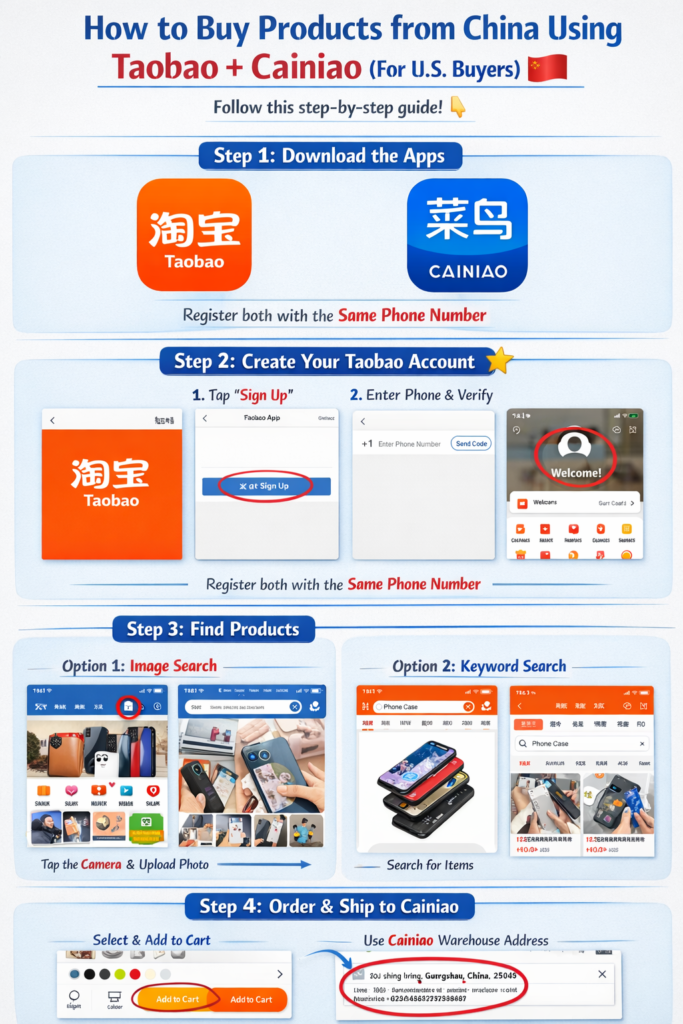
Buying directly from China can save you a lot of money and give you access to products you can’t find elsewhere. With Taobao and the Cainiao (菜鸟) logistics app, it’s easier than ever. Follow this step-by-step guide. 👇
Step 1: Download the Apps 📱
First, install the two apps you’ll need:
- Taobao (淘宝) – the shopping platform
- Cainiao (菜鸟) – for shipping and package forwarding
You can find them in the App Store or Google Play.
Recommended setup:
- Download Taobao
- Download Cainiao
- Register both using the same phone number
💡 Tip: Use the international version of Taobao if available.
Step 2: Create Your Taobao Account 🧾
- Open Taobao
- Tap Sign Up
- Register using your phone number
- Verify with the SMS code
Now your Taobao account is ready.
Step 3: Find Products 🔍
You can search in several ways:
Option 1: Image search (best method)
- Tap the camera icon in Taobao
- Upload a photo of the item
- Taobao will show similar products
Option 2: Keyword search
Example keywords:
- phone case
- LED lights
- clothing
- electronics
💡 Tip: Use Google Translate to translate English to Chinese for better results.
Step 4: Choose a Good Seller ⭐
Before buying, check:
- ⭐ Store rating
- 💬 Customer reviews
- 📦 Sales volume
- 📷 Real buyer photos
This helps avoid low-quality products.
Step 5: Order the Product 🛒
- Select size/color/options
- Tap Add to Cart or Buy Now
- Enter the Cainiao warehouse address (forwarding address)
Most international buyers ship first to a Chinese warehouse, then forward overseas.
Step 6: Use Cainiao for International Shipping ✈️
Open Cainiao App (菜鸟).
- Add your U.S. shipping address
- Link your Taobao account
- Track packages sent to the warehouse
- Combine multiple packages
- Choose international shipping
Popular options:
- Air shipping (fast)
- Sea shipping (cheap)
- Consolidated shipping (recommended)
📦 Consolidation saves a lot on shipping.
Step 7: Pay for Shipping 💳
When your items arrive at the warehouse:
- Cainiao will notify you
- Select packages
- Choose shipping method
- Pay shipping fee
Most apps accept:
- Visa
- Mastercard
- Alipay
Step 8: Track Your Package 🚚
You can track the shipment inside Cainiao.
Typical delivery times:
- ✈️ Air shipping: 7–15 days
- 🚢 Sea shipping: 20–35 days
Tips for U.S. Buyers 💡
✔ Buy from stores with high ratings
✔ Read buyer reviews with photos
✔ Use Google Translate for chatting with sellers
✔ Consolidate packages to save shipping cost
✔ Avoid restricted items (batteries, liquids, etc.)
Why Buy from Taobao? 🤔
Advantages:
📦 Access to wholesale prices
💰 Much cheaper than Amazon
🛍 Huge product variety
🏭 Direct from Chinese manufacturers
✅ That’s it! With Taobao + Cainiao, you can shop directly from China and get products delivered to your home in the United States.
Happy shopping! 🎉📦
About the author
Tommy Leffler
BuyFromTao covers Taobao buying workflows, shipping decisions, and affiliate picks for English-speaking overseas buyers.
More in Beginner GuidesRelated articles
Get new picks, shipping updates, and beginner tips
Built for English-speaking buyers who want practical recommendations instead of endless trial and error.